L-Shaped & Corner Standing Desks: Maximizing Your Office Layout
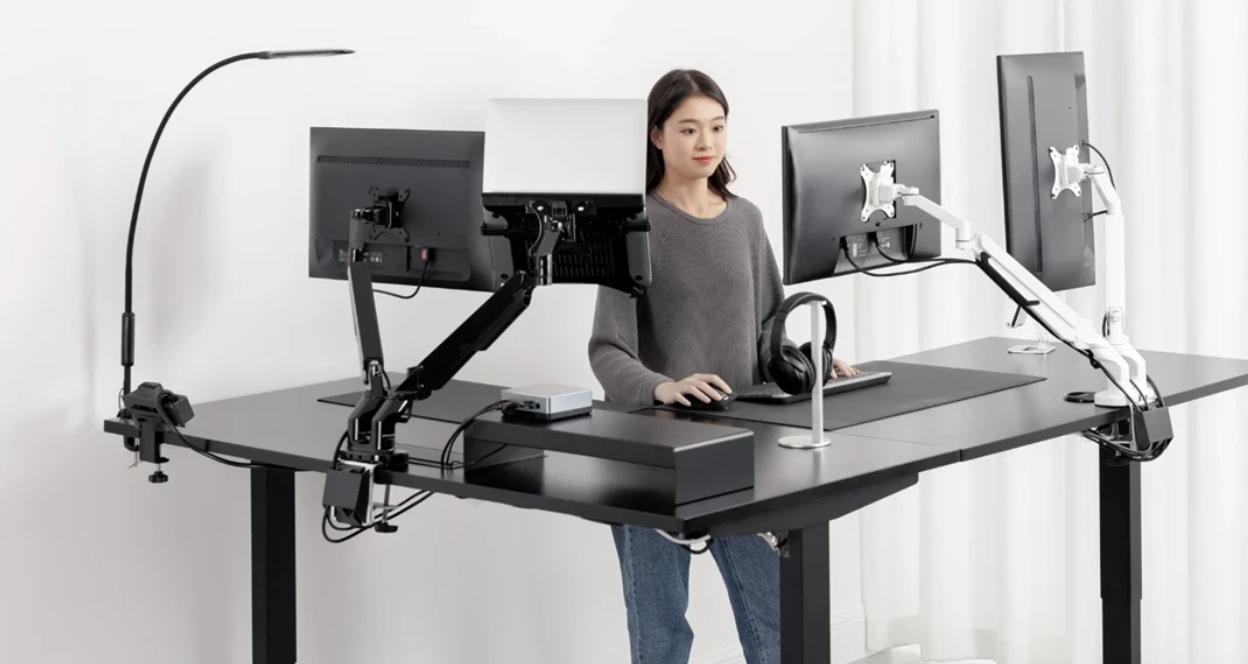
Most home offices have a corner doing nothing. The extra chair lives there, or a box that arrived six months ago and never got dealt with. Meanwhile the desk is against one wall taking up linear space the room can barely afford, and the working surface is never quite enough for everything that needs to be on it.
A corner desk uses that dead space. A corner standing desk uses it while also solving the posture problem that a fixed-height desk doesn't. Getting both from one piece of furniture is a better outcome than most people expect when they start looking.
What the Corner Actually Does
The geometry works differently from a straight desk. Two walls provide the structure, the desk tucks into the corner, and the footprint stays contained while the surface area expands into space that wasn't being used anyway. The centre of the room stays open. The desk doesn't push into the room the way a large straight desk does even when the total surface is substantially larger.
In a room that serves more than one purpose, this matters more than it might seem. A corner configuration reads as a contained workspace rather than as a desk that's taken over the room. The visual presence is smaller than the actual working area.
The L-shape also does something a large straight desk doesn't: it creates two distinct zones. Primary work on the arm directly in front. Reference material, secondary screen, the things that need to be nearby but not constantly in front, on the other arm. That physical separation between different types of work changes how the surface gets used. It's not just more room. It's a different way of organising how work happens.
Height Adjustment on a Corner Desk
A corner standing desk that adjusts height is mechanically more complex than a straight sit-stand desk. Both arms of the L need to move together. If they don't, one side ends up higher than the other, which makes the desk less functional and puts asymmetric stress on the frame over time.
Synchronised motorised adjustment from a single controller is what makes this work properly. Worth confirming before buying because configurations vary, and the difference in daily use between synchronised and independent adjustment is significant.
Stability at full standing height is the other thing to check. The L-shape creates a larger lever arm than a straight desk, which means a frame that feels solid at seated height may develop movement at full standing extension, particularly toward the outer corners. Cross-bracing and a quality motor system are what separate frames that hold up over time from ones that develop wobble and get used at one height because adjusting them stopped feeling worth it.
When the Room Is Smaller
The standard assumption about corner desks is that they need a large room. This isn't always true.
A small corner standing desk designed specifically for compact spaces keeps the spatial efficiency of the L configuration at a footprint that fits rooms a full-size corner desk wouldn't. The corner placement does most of the spatial work. The compact dimensions handle the rest.
Arm depth is the dimension that matters most here. Arms around 100 centimetres each provide a genuinely usable surface on both sides without extending far enough from the corner to crowd the room. The total surface area is still substantially more than a straight desk of equivalent footprint. The trade-off is that a compact corner desk won't accommodate three monitors as easily as a full-size one, but for most home office setups that's not the constraint.
Making the Two Zones Work
The dual-surface setup is most useful when it's set up with some intention rather than treated as a larger version of a single desk.
Primary monitor and keyboard on the arm in front. Whatever needs to be reachable but not constantly in use on the secondary arm. The separation that results from this arrangement reduces the constant shuffling and reorganising that happens on a single crowded surface. Things have places because there's room for them to have places.
Monitor arms rather than stands suit a corner configuration better. Stands add footprint to surfaces that are already being shared between equipment. Arms free up the desk and allow the monitors to be positioned precisely for the seating position, which on a corner desk often means angling two screens toward the chair rather than having them face straight ahead.
Cable management needs planning at setup rather than afterward. Two arms, cables coming from two directions, a frame with more complex geometry than a straight desk. A cable tray along the back of each arm, a power strip PDU mounted underneath so everything runs to one point, enough slack in every run to accommodate the full height adjustment, and the time taken to do it properly at the start keeps the finished setup looking organised rather than like something that happened to it.
The Room Question
Corner standing desks work best when the corner is the natural anchor for the workspace and the centre of the room needs to stay open.
In a dedicated home office the corner uses the room efficiently and leaves the remaining floor area unobstructed. In a shared-use room the corner contains the workspace well enough that the rest of the room can be organised around other things. A sofa facing away from the desk corner. A reading area in another part of the room. The workspace is present but not defining the whole room.
The height-adjustable element adds a dimension to this that a fixed corner desk doesn't have. At seated height the desk recedes. At standing height it becomes more present. The room reads slightly differently depending on whether work is happening or not. That responsiveness is a quality worth having in a space that needs to function as more than just an office for most of the hours it's occupied.